



LastPass Backup Phishing Campaign Exposed: Deceptive Requests Target Password Vaults
Published on January 22, 2026

Key Takeaways
- Urgency Tactic: Attackers are impersonating LastPass in emails, falsely claiming imminent maintenance to pressure users into "backing up" their vaults within 24 hours.
- Credential Theft: The phishing links redirect users to malicious sites designed to steal master passwords, granting attackers full access to victims' stored credentials.
- Official Warning: LastPass confirmed that it never asks for master passwords or demands urgent backups, and advises users to report and delete these fraudulent communications.
A sophisticated LastPass phishing campaign has been identified, targeting users of the popular password manager with fraudulent emails designed to steal master passwords. The campaign, which began around January 19, utilizes social engineering tactics centered on false claims of scheduled maintenance.
Attackers are sending emails with subject lines urging recipients to perform an immediate backup of their vaults within a 24-hour window. This manufactured urgency is a classic hallmark of a backup phishing scam, aiming to bypass critical thinking and force users into hasty actions that compromise their password manager security.
Technical Analysis of the Phishing Mechanism
The fraudulent email titles contain terms such as “infrastructure update,” “Backup,” “Maintenance,” and include call-to-action links, such as "create backup now," LastPass has reported.
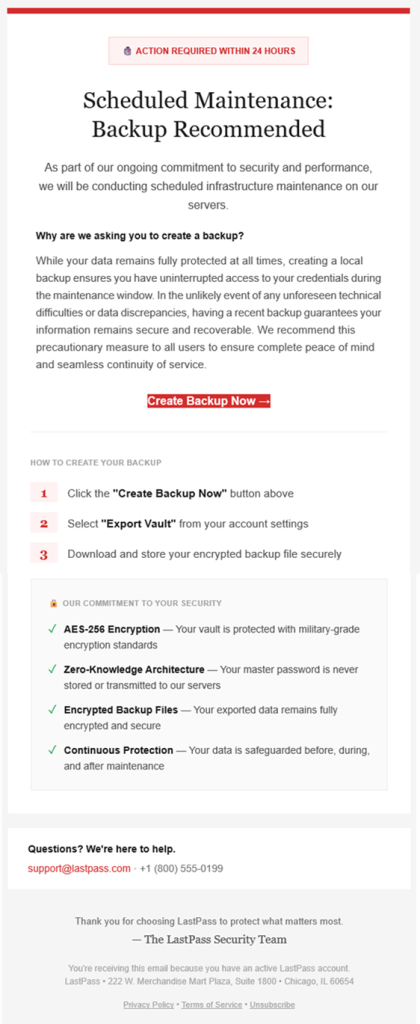
Rather than initiating a legitimate backup process, this link redirects the victim through an AWS S3 bucket URL (group-content-gen2.s3.eu-west-3.amazonaws.com) before landing on a deceptive domain (mail-lastpass.com).
Once on the phishing site, users are prompted to enter their master password. Since the master password serves as the decryption key for the user's entire vault, divulging it grants threat actors unrestricted access to:
- all stored usernames,
- passwords,
- credit card numbers,
- secure notes.
Phishing Prevention Tips and Remediation
The LastPass security advisory confirms that the company does not ask customers to perform urgent backups or request master passwords via email. Key phishing prevention tips include:
- verifying sender addresses,
- hovering over links to inspect the destination URL before clicking,
- enabling multi-factor authentication (MFA) on all sensitive accounts.
If a user suspects they have clicked a malicious link, they should immediately change their master password and update the credentials for critical accounts stored in their vault.
A recent Veeam report highlighted that remote access compromise, phishing, social engineering, and rapid exploitation of flaws are currently the top attack vectors.
Related



Get expert insights on threats, breaches, scams, and security trends — delivered every Monday.
Most Popular

Get expert insights on threats, breaches, scams, and security trends — delivered every Monday.
Most Popular