



Gmail Voicemail Phishing Scam Uses Malicious CAPTCHA on Fake Websites to Steal User Credentials
Published on August 18, 2025

- Gmail phishing: A Gmail scam leverages CTA buttons that reportedly help with listening to voicemail messages.
- How it happens: These notifications redirect to malicious Gmail login pages with fake CAPTCHA verifications.
- The goal: Gmail credentials, 2FA codes, and even backup recovery options are exposed to attackers.
A Gmail voicemail phishing scam has been uncovered, exploiting legitimate platforms to deceive victims. The scam utilizes fake voicemail notifications, employing trust-building tactics such as CAPTCHA verifications and well-crafted phishing sites to steal Gmail credentials.
Phishing Tactics
A cybersecurity report posted on Malware Analysis, Phishing, and Email Scams says the attack begins with an email claiming a new voicemail notification. The email includes a "Listen to Voicemail" button that links to a Microsoft Dynamics domain, lending an air of legitimacy.
Once clicked, the link redirects users to a CAPTCHA page hosted on the malicious domain horkyrown[.]com.
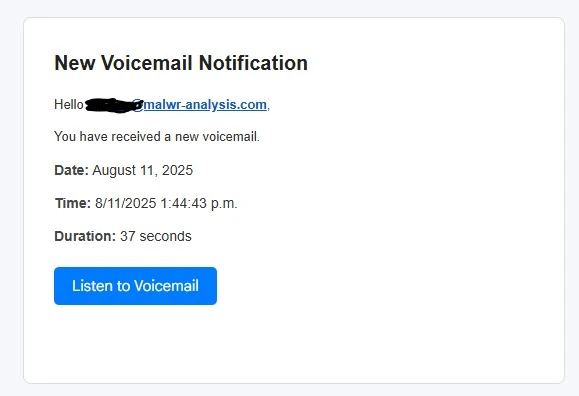
This CAPTCHA step, which is popular among cybercriminals, builds trust by simulating a security measure, but victims are ultimately redirected to a fake Gmail login page. This clone mimics the official Google sign-in interface to harvest credentials.
![Users are redirected to a CAPTCHA page hosted on the malicious domain horkyrown[.]com](https://cdn.technadu.com/wp-content/uploads/2025/08/Users-are-redirected-to-a-CAPTCHA-page-hosted-on-the-malicious-domain-horkyrown.com-.webp)
The heavily obfuscated fake Google login page collects:
- Email/username
- Password
- Multiple 2FA methods (SMS code, voice call code, Google Authenticator code, “mobile prompt” code)
- Recovery email, backup codes
- “Create strong password”, “confirm phone” follow-ups
Advanced coding techniques, such as JavaScript debugger cloaking, prevent security researchers from inspecting the phishing flow easily.
Indicators of Compromise (IOCs)
Key phishing indicators include the use of mismatched email headers and domain misalignment.
For example, the email appears to originate from “Swissklip.com” but fails DMARC validation, a common sign of spoofing. Identified domains used in this campaign include “riuy.horkyrown.com” for phishing pages and “purpxqha.ru” for hidden backend requests.
Recommended Actions
To protect against fake Gmail login scams and similar phishing attempts, users should:
- Scrutinize emails for inconsistent headers or unexpected sender domains
- Verify URLs
- Enable multi-factor authentication (MFA)
- Use real-time anti-phishing software
By staying vigilant and conducting thorough email inspections, users can protect themselves against increasingly sophisticated phishing scams.
Related






Get expert insights on threats, breaches, scams, and security trends — delivered every Monday.
Most Popular
Get expert insights on threats, breaches, scams, and security trends — delivered every Monday.
Most Popular